The Ultimate Guide to Knowledge Base Software in 2026
Wondering what a knowledge base is? You've come to the right place. We'll cover what knowledge base software does, how to use it effectively, pitfalls to avoid, and how future trends like AI and making a difference.


Wondering what a knowledge base is? You've come to the right place. We'll cover what knowledge base software does, how to use it effectively, pitfalls to avoid, and how AI agents are fundamentally changing the game.
I have a confession to make. I once spent the better part of a Tuesday afternoon searching for a single, stupidly simple piece of information.
It was buried somewhere in a shared drive, a relic from a forgotten project, guarded by a dragon of confusing folder names. I clicked, I searched, I Slack-messaged.
It was a digital archaeological dig, and I was losing. Badly. By the time I found it, my productivity was shot, my morale was in the toilet, and my will to live was hanging on by a thread 😩
We've all been there, right?
That frantic, soul-crushing scramble for information is a universal experience in the modern workplace. It's the digital equivalent of looking for your keys when you're already late. And it's not just a minor annoyance; it's a colossal waste of time and money.
Research from the McKinsey Global Institute found that a searchable record of knowledge can reduce the time employees spend searching for company information by up to 35%. And that's before we even consider how AI is accelerating all of this.
Panopto found that knowledge workers burn an average of 5 hours every week on information searches. Five hours! That's an entire afternoon, gone. Poof. And 63% of employees said they'd prefer to work for companies that actually preserve and share knowledge, rather than letting it disappear when someone goes on holiday or leaves.
What if there was a better way? A central hub of knowledge, a single source of truth for your organization and your customers. A place that turns that frantic, desperate search into a simple, satisfying find.
That's exactly what a knowledge base is. And in this guide, we're going to dig into everything: what a knowledge base is, what the software does, how AI agents are turning knowledge bases into something far more powerful than a glorified FAQ page, and how to get real, measurable ROI from the whole thing.
Grab a coffee, get comfy, and let's end the era of the soul-crushing information search. Together.
Part 1: What Is a Knowledge Base? 🤔
At its core, a knowledge base is a self-serve library of information about a product, service, department, or topic. Think of it as your company's brain, a centralized repository where all your important information lives.
This shouldn't be just a messy folder of random documents, though.
A good knowledge base is organized, searchable, and constantly updated. It's a living, breathing entity that grows and evolves with your organization.
It's more than just a glorified FAQ page, too. While FAQs are a part of a knowledge base, it also includes in-depth articles, how-to guides, video tutorials, troubleshooting manuals, and any other resources that can help someone solve a problem or learn something new.
The goal is to empower people (both customers and employees) to find the answers they need, when they need them, without having to ask for help.
There are two main flavors of knowledge bases, and understanding the distinction is key:
Internal Knowledge Base
This is for your team. It's a private, internal resource that houses everything they need to know to do their jobs effectively. Think company policies, HR information, sales playbooks, marketing brand guidelines, engineering best practices, project documentation, and support workflows.
It's a lifesaver for onboarding new hires and ensuring everyone is on the same page. A well-maintained internal knowledge base is the secret weapon of a productive and aligned team 🛟
It's the difference between a new hire feeling supported and empowered, versus feeling like they've been thrown in the deep end without a life jacket.
💡 BambooHR surveyed 1,500 full-time U.S. employees and found that 62% of new employees felt there wasn't enough training on company products and services. That's a knowledge base problem, not a people problem.
External Knowledge Base
This one is for your customers. It's a public-facing self-service portal where they can find answers to their questions about your products or services, things like troubleshooting guides, user manuals, getting-started guides, and answers to common questions.
A great external knowledge base can significantly reduce the number of support tickets you receive and make your customers happier. Think articles like:
- How to reset your password
- Upgrading your plan
- Transferring account ownership
And customers genuinely want to help themselves. A Harvard Business Review study found that 81% of customers attempt to resolve issues themselves before reaching out to a live rep. They're not being antisocial. They just don't want to wait in a queue for something they could solve in two minutes.
Whether it's for internal or external use, the purpose of a knowledge base is the same: to capture, organize, and share knowledge in a way that is easy to access and understand. It's about democratizing information and empowering people to be more self-sufficient.
 River Sloane
And if you're wondering whether these need to be separated or not, the answer is no! It actually makes authoritative knowledge sharing a whole lot easier to have it in the same place, since there's often crossover between public and internal knowledge.
So now you know what a knowledge base is. But here's where it gets interesting: the software behind it.
Part 2: What Does Knowledge Base Software Actually Do?
Now that we know what a knowledge base is, let's talk about the software that powers it. Knowledge base software is the tool that allows you to create, manage, and share all of that valuable information.
It's basically the engine that makes your knowledge base run smoothly.
While you could technically try to build a knowledge base using a bunch of Google Docs and a shared drive, you'd quickly run into a world of pain. I mean, picture yourself trying to organize 47 different Google Docs with names like "New Process FINAL v3.1.1."
It would be super disorganized, difficult to search, and a nightmare to maintain. That's why dedicated knowledge base software is so essential. It provides the structure, features, and functionality you need to create a truly effective knowledge base.
 River Sloane
Here are some of the core functionalities you'll find in most knowledge base software:
- 📝 Content Creation and Editing: This is the heart of the software. A good knowledge base tool will have a user-friendly editor (often a "What You See Is What You Get" or WYSIWYG editor) that makes it easy to create and format articles. You shouldn't need a degree in computer science to write a help article. It should be as easy as writing an email. The software should also support collaboration, so multiple team members can work on content together, leave comments, and track changes.
- 📂 Organization and Structure: A knowledge base is only as good as its organization. The software should allow you to categorize and tag articles, create a logical hierarchy, and make it easy for users to browse and find what they're looking for. This is crucial for preventing your knowledge base from becoming a digital junk drawer. A well-structured knowledge base guides users to the information they need, even if they don't know exactly what they're looking for.
- 🧭 Powerful Search Functionality: This is a big one. The search bar is often the first place a user goes when they have a question. The software should have a powerful search engine that can understand what the user is looking for, even if they don't use the exact right keywords. In 2026, that increasingly means semantic search powered by AI, which we'll get to shortly. A good search experience is non-negotiable.
- 📊 Analytics and Reporting: How do you know if your knowledge base is actually helpful? Analytics! The software should provide you with data on what users are searching for, which articles are being viewed the most, what search terms are returning no results, and where there might be gaps in your content. This information is gold for improving your knowledge base over time. It allows you to make data-driven decisions about what content to create, update, or (sometimes bravely) delete.
- 👀 User Feedback Mechanisms: The best way to know what your users think is to ask them. Most knowledge base software includes ways for users to provide feedback, like rating articles ("Was this article helpful?") or leaving comments. This direct feedback loop is invaluable for keeping your content relevant and helpful. It turns your knowledge base from a monologue into a conversation.
- 🧑🎨 Branding and Customization: Your knowledge base should look and feel like an extension of your brand. Good software will allow you to customize the appearance of your knowledge base with your own logo, colors, and fonts. This creates a seamless experience for your users and reinforces your brand identity.
- 🧩 Integrations: Your knowledge base doesn't exist in a vacuum. It should be able to connect with the other tools you use every day, like your help desk, CRM, or team chat software. Integrations streamline your workflows and make your knowledge base even more powerful.
The benefits of using dedicated software are huge. It ensures consistency in your content, improves efficiency for your team, is scalable as your company grows, and ultimately leads to a better experience for both your customers and your employees.
It's the foundation upon which a successful knowledge management strategy is built 🧱
Part 3: Getting the Most Out of Your Knowledge Base Software
So you've got your knowledge base software. Congrats! 🎉
Now what? Just having the tool isn't enough. You need to use it effectively.
We've got a ton of resources on this (feel free to take a look at our Learn page), but here's a quick rundown.
A knowledge base is like a houseplant; it needs to be watered, dusted, and misted if you want it to flourish (especially my little diva's 🌺✨). Here are some tips and best practices to help you create a knowledge base that truly shines.
Tip #1: Listen to Your Audience 🫶
The best way to know what help content to create is to listen to the people who are using it. Whether that's your customers or your employees. Think about:
- What are the most common questions your support team gets?
- What are the biggest pain points for your customers?
- What are the recurring questions that pop up in your company's Slack channels?
Use this information to create help content that addresses real needs. Your support ticket data and internal chat logs are a goldmine of ideas for knowledge base articles.
Tip #2: Keep it Clear and Simple 🦤
Write in a clear, concise, and human-centric language. Avoid jargon and technical terms as much as possible, since your reader probably doesn't understand the subject like you do.
 River Sloane
And remember, a little personality can go a long way in making your content more engaging (but not too over the top). Break up long paragraphs into smaller, digestible chunks. Use headings, bullet points, and bold text to make your articles easy to skim.
Tip #3: Mix it Up 🍭
Don't be afraid to use a variety of formats to get your message across. As well as text, consider using images, screenshots, GIFs, and video tutorials. Different people learn in different ways, so a mix of media can make your knowledge base more accessible and effective.
 River Sloane
A well-placed screenshot can often explain something more clearly than a hundred words of text.
Tip #4: Focus on Actionable Solutions 🙇
When a user comes to your knowledge base, they're usually looking for a solution to a problem. They're not here for the vibes. Make sure your content is focused on providing clear, actionable steps that they can follow to solve their issue.
 River Sloane
Start with the "why," then move on to the "how." A good structure for a help article is to first explain the problem, then provide a step-by-step solution.
Tip #5: Keep it Fresh 🌷
An outdated knowledge base is, unfortunately, a useless knowledge base. In fact, it can be worse than useless, because it can provide incorrect information that leads to even more problems. (Nothing says "we value your time" like a help article with screenshots from three redesigns ago.)
 River Sloane
It's crucial to have a process in place for regularly reviewing and updating your content. This ensures that your information is always accurate and relevant. And here's a new reason to care about freshness: AI search engines show a strong preference for recently updated content.
Research suggests that AI systems discover and start citing new content within days, compared to the weeks or months typical of traditional SEO. If your knowledge base is stale, AI won't surface it. Ouch.
Tip #6: Build it as a Team 👌
A knowledge base shouldn't be the responsibility of just one person or one team (although, let's admit, it happens all too often).
 River Sloane
Encourage everyone in your organization to contribute their knowledge and expertise. A collaborative approach will make your knowledge base richer, more comprehensive, and more up-to-date. Your subject matter experts are your biggest asset here. Create a culture where sharing knowledge is valued and rewarded.
Tip #7: Dive into your Data
Pay attention to the data your knowledge base software provides. It can tell you what's working, what's not, and where you need to focus your efforts.
Are users searching for terms that don't have any corresponding articles? That's a clear signal that you need to create new content. Are users consistently giving a particular article a low rating? That's a sign it needs to be reviewed and improved.
 River Sloane
Use these insights to continuously improve your content and fill any knowledge gaps.
Tip #8: Make Sure it's Findable 🗺️
Your knowledge base won't do anyone any good if they can't find it. Make sure it's prominently displayed on your website, in your app, and in your email signatures. Your support team should also be trained to direct users to the knowledge base whenever possible.
Also make sure it ranks well for search terms on Google or AI summaries. This will make it even easier for your customers to find answers.
Tip #9: Integrate it into Your Workflows 🌊
For a knowledge base, the key to adoption is to make it an integral part of your team's daily workflows. Encourage your team to search the knowledge base before asking a question in Slack. (We all know that person who asks before searching. Don't be that person.)
 River Sloane
When a customer asks a question that's answered in the knowledge base, reply with a link to the article. This helps to build the habit of checking the knowledge base first.
Tip #10: Make it Mobile-Friendly 📱
This shouldn't need saying in 2026, but your knowledge base absolutely has to work well on mobile devices. Your employees and customers need to be able to access it from anywhere, at any time.
Think about the use cases. A field service technician looking up a repair manual on their tablet. A sales rep pulling a product spec sheet on their phone before a client meeting. A customer troubleshooting an issue on the bus while pretending they're not running late.
If your knowledge base is a pain to use on a smartphone, folks simply won't use it 😬
When choosing knowledge base software, test it on a variety of mobile devices. The mobile experience should be just as good as the desktop experience.
Building a great knowledge base is an ongoing process. It requires a commitment to creating high-quality content, keeping it up-to-date, and promoting it to your users. But the payoff is huge. A well-maintained knowledge base can be one of your most valuable assets.
Part 4: AI, Agents, and Your Knowledge Base 🤖
OK, let's talk about the elephant in the room. The really smart, occasionally overconfident elephant.
If the 2025 story was "AI is coming to knowledge management," the 2026 story is "AI has moved in, unpacked its bags, and rearranged the furniture."
AI isn't just a feature bolted onto knowledge base software anymore. It's becoming the core infrastructure that powers how businesses deliver support. And the shift from basic chatbots to genuinely capable AI agents is the single biggest change in this space since... well, since knowledge bases went online in the first place.
 River Sloane
But (and this is a big but) it's also important to know what AI isn't good at, and why you still need experts and technical writers on your team. More on that in a sec.
From Chatbots to AI Agents
Let's be honest: the chatbots of a few years ago were mostly frustrating. They matched keywords, spat out a canned response, and wished you a nice day whether they'd helped or not. It was like asking a brick wall for directions and getting a coupon instead.
AI agents in 2026 are fundamentally different. They understand context, remember previous interactions, and can actually do things. Not just suggest articles, but process refunds, adjust orders, schedule appointments, and route complex issues to the right human.
The numbers tell the story. Gartner predicts that by 2029, agentic AI will autonomously resolve 80% of common customer service issues without human intervention, leading to a 30% reduction in operational costs.
And MarketsandMarkets estimates the agentic AI market will grow from $7.06 billion in 2025 to $93.20 billion by 2032. That's not a typo. Billion with a B.
And here's what matters for your knowledge base: every single one of those AI-resolved conversations depends on the quality of your documentation. An AI agent is only as good as the knowledge it can draw from. Garbage in, garbage out.
If your knowledge base is a mess, your AI agent will be a mess too.
Memory-Rich AI
Remember those chatbots that treated every conversation like meeting a stranger? "Hi! How can I help you today?" for the fourteenth time? Yeah. Those days are numbered.
Memory-rich AI is one of the most meaningful shifts happening right now. These systems retain context and preferences across sessions, making support faster and far more personal.
Picture this: a customer reaches out about a failed payment at 11 PM. The AI agent pulls up their account history, grants a temporary access extension, and flags the billing issue for review. The next morning, a human specialist picks it up with full context. No repetition, no "can you explain the issue again?", no lost details.
 River Sloane
That seamless handoff between AI and human only works when both are drawing from the same well-maintained knowledge base.
Connected Reps and Agent Assist
AI isn't just customer-facing, either. One of the most practical applications is what Gartner calls "Connected Rep" technology: AI that feeds your support agents the right knowledge base article at the right moment during a live conversation. Think of it like a really good co-pilot who always has the right manual open.
Gartner found that implementing this kind of agent-assist technology can improve contact center efficiency by up to 30%. It's not about replacing your team; it's about giving them superpowers.
Voice and Multimodal Support
AI-powered support is also moving beyond text. Voice AI agents can now handle routine calls with natural tone and near-human understanding. Visual AI can interpret images and video for remote diagnostics.
Zendesk's CX Trends 2026 report found that nearly 8 in 10 consumers said being able to share media (images, video) makes support easier. Makes sense, right? "My widget is broken" is a lot less helpful than a photo of the broken widget.
This has real implications for knowledge base content. If your docs are text-only, you're limiting what AI agents can work with. Screenshots, diagrams, and video walkthroughs aren't just nice for humans; they're training data for multimodal AI.
The Executive Pressure Is Real
This isn't a "nice to explore someday" situation anymore. A Gartner survey of 321 customer service leaders found that 91% are under executive pressure to implement AI, not just for efficiency, but to directly improve customer satisfaction.
When 9 out of 10 bosses are asking "where's our AI?", you know the conversation has shifted 😅
At the same time, over 80% of organizations expect to reduce agent headcount in the next 18 months through attrition, hiring pauses, or restructuring. If you're shrinking your human support team, your self-service and AI-powered support has to work. And that starts with your knowledge base.
The Foundation Problem (a.k.a. Don't Skip Leg Day)
Here's the tension: everyone's rushing to implement AI, but the foundations aren't always there. Gartner has warned that 99% of AI initiatives in IT service management fail due to a lack of established knowledge management foundation.
99%! That's basically everyone!
You can't just sprinkle some AI on top of a messy, disorganized knowledge base and expect magic to happen. You need a solid foundation of well-structured, high-quality content for the AI to work with. AI without good documentation is just a very expensive way to give wrong answers with confidence.
👻 Myth-buster: AI will replace knowledge base writers. The reality is that AI requires high-quality, human-written content to draw from. Without it, AI agents hallucinate, give wrong answers, and erode customer trust faster than you can say "sorry about that."
And while we're busting myths, watch out for "agent-washing," a growing concern among service leaders where products are marketed as "agentic" when they're really just rule-based chatbots wearing a fancy hat. If a vendor's AI can't actually take actions or reason through complex queries, it's a chatbot with better marketing. Don't fall for it.
Part 5: Making Your Knowledge Base AI-Ready 🔍
Alright, so AI is reshaping everything. What does that mean for your knowledge base specifically? Quite a lot, actually.
With AI-powered search engines, large language models (LLMs), and AI agents all pulling from web content, there's a new dimension to knowledge base optimization that didn't exist a few years ago.
It's no longer enough for your knowledge base to be findable by humans and Google. It also needs to be readable by machines. (The machines are picky readers, it turns out.)
Answer Engine Optimization (AEO)
AEO is about structuring and writing your content in a way that makes it easy for AI to understand and use. The goal is to make your knowledge base the go-to source of truth for AI systems, so that when someone asks ChatGPT or Perplexity a question about your product, the answer comes from your content.
Here are a few tips to make your knowledge base AI-friendly:
- Structure Your Content Logically: Use clear headings (H1, H2, H3) and a logical hierarchy. This helps AI understand the flow of your information. Think of headings as signposts: AI follows them the same way you'd follow signs in a supermarket.
- Embrace Structured Data: FAQs, how-to guides, and step-by-step instructions are gold for AI. They provide clear, concise answers to specific questions that AI can easily extract and present. If you have a long list of FAQs, consider breaking them into smaller, more focused articles.
- Don't Forget Your Images: Add descriptive alt text to your images to help AI understand what they're about. If an image contains important information, make sure that information is also present in the text.
- Link it Up: Internal linking shows the relationships between different pieces of content. This helps AI understand context and provides a better experience for everyone. If you mention a related topic in an article, link to the article that covers it in more detail.
- Define Your Jargon: Every industry has its own terminology. Don't assume AI will understand your niche terms. Define them clearly in your content. If you had to Google it when you started, your reader (human or AI) probably will too.
For a deeper dive, check out our post on how to make your knowledge base AI-optimized.
The llms.txt Question
You might have heard about llms.txt, a proposed standard (think of it like robots.txt, but for AI models) that gives LLMs a clean, structured map of your most important content.
Major companies like Anthropic, Cloudflare, and Stripe have adopted it, and hundreds of thousands of sites have implemented it.
 River Sloane
But here's the honest truth: the evidence for its impact is mixed at best. An analysis of 94,000+ URLs cited across 11,000+ AI responses found that exactly one was an llms.txt page. One! Out of ninety-four thousand! Semrush ran their own tests and found zero visits from major AI crawlers to their llms.txt file over a two-month period.
Does that mean you should ignore it? Not necessarily. It's low effort to implement and it can't hurt. But it's firmly in the "nice to have" category, not the "drop everything" category. Focus on getting your content quality, structure, and freshness right first. That's what actually determines whether AI surfaces your docs.
We've written more about this in our post on how AI finds your documentation, including the differences between llms.txt, sitemaps, and source pages.
Your Knowledge Base Is Now AI Infrastructure
Here's the bigger conceptual shift for 2026, and it's worth sitting with for a moment: your knowledge base isn't just a support tool anymore. It's the data layer that powers your entire AI support stack.
AI agents resolve customer conversations by drawing from your docs. They identify gaps in your content when customers ask questions that can't be answered. They flag outdated articles based on changing product behaviour. And the best AI knowledge base tools are now automatically generating article drafts from support conversations themselves.
The feedback loop is tightening: AI handles tickets → spots gaps → flags missing docs → humans write better articles → AI gets smarter. That's a compounding return on every hour you invest in knowledge base quality. Like compound interest, but for documentation. (Finally, something that makes documentation sound exciting.)
This also means the cost of not maintaining your knowledge base is higher than ever. A stale or incomplete KB doesn't just frustrate a few customers browsing your help centre. It degrades the performance of every AI system that depends on it.
Part 6: The Real ROI of a Knowledge Base 💰
Let's talk money. Because a well-maintained knowledge base is more than just a nice-to-have. It's a strategic asset with a real, measurable impact on your bottom line.
But don't just take our word for it. The data speaks for itself.
Reduced Support Tickets
This is the most obvious and immediate ROI. When customers find answers on their own, they don't need to contact your support team. This frees up your agents to focus on complex, high-value issues, the ones where human empathy and judgment actually matter.
❗ Take 30 seconds: What's your support team's hourly cost × hours spent on repetitive questions = $$$?
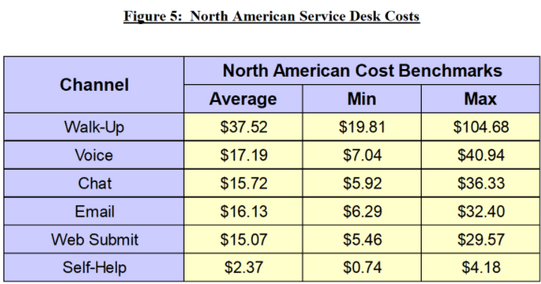
The cost difference is dramatic. According to MetricNet, self-help costs around $2.37 per resolution while email support averages $16.13. That's nearly 7x more expensive for essentially the same answer. Your CFO just felt a disturbance in the Force.
Increased Support Team Productivity
A knowledge base isn't just for customers. It's an essential tool for your team, especially your support folks.

Become an expert in all things Knowledge Base with our monthly newsletter. No spam, just expert content, delivered.
They can use it to quickly find accurate, approved answers to customer questions, which significantly improves productivity and consistency. And for new hires, an internal knowledge base is a game-changer: it dramatically speeds up onboarding and reduces time to productivity. (No more "ask Sarah, she's been here the longest" as your onboarding strategy.)
This matters even more now. With over 80% of organizations expecting to reduce agent headcount in the coming months, the agents who remain need to be more efficient than ever. A solid knowledge base is how you get there without burning out your remaining team.
Increased Customer Satisfaction
Customers want fast, easy answers. A good knowledge base gives them exactly that. Research published in the International Journal of Advanced Research in IT and Engineering found that knowledge management has a significant positive impact on customer satisfaction. Not groundbreaking news, but nice to have the receipts.
Better Organizational Performance
Academic research in the Journal of Knowledge Management found that knowledge management practices are directly related to organizational performance. Organizations that effectively manage their knowledge are more agile, more innovative, and more competitive.
And the market is responding. Business Research Insights estimates that the knowledge base software market was valued at approximately $1.74 billion in 2024 and is projected to reach $6.96 billion by 2033. That kind of growth doesn't happen without proven ROI.
The Self-Service Gap (and Opportunity)
Here's where it gets really interesting. While 81% of customers attempt to self-serve, a Gartner survey of 5,728 customers found that only 14% of customer service issues are fully resolved through self-service. That's despite 73% of customers using self-service at some point in their journey.
Read that again. 81% of people try to help themselves. 14% actually succeed. That's a canyon-sized gap between intention and outcome.
45% of customers who started in self-service said the company didn't understand what they were trying to do. That's not a customer problem. That's a content problem.
The good news? A 2025 Gartner survey of customer service leaders confirmed that self-service portals, live chat, and knowledge management systems are now considered the most essential technologies for fast, scalable support, overtaking traditional channels like phone and email.
The gap between customer expectation and actual resolution is your opportunity. Close it with better content, better structure, and better AI integration, and the ROI follows.
What to Track
To measure the success of your knowledge base, keep an eye on:
- Ticket Deflection Rate: The percentage of users who find an answer without submitting a ticket.
- Article View and Search Data: Which articles are most popular? What are users searching for? What searches return zero results?
- User Feedback Scores: Are users finding your articles helpful?
- Time to Resolution: How quickly are agents resolving issues? A good KB should reduce this.
- Customer Satisfaction (CSAT) Scores: The ultimate measure of whether your self-service is working.
By tracking these, you can demonstrate tangible ROI and make a strong case for continued investment. Numbers talk. Especially to the people holding the budget.
Part 7: Common Pitfalls in Knowledge Management 🚧
If building and maintaining a world-class knowledge base were easy, everyone would have one 😅
The reality is, there are some common challenges that can derail even the best-laid plans. But forewarned is forearmed. By understanding these potential roadblocks, you can create a strategy to navigate around them.
Pitfall #1: Organizational Silos
This is the biggy. In many companies, information is trapped in different departments, teams, or even in the heads of individual employees. Deloitte found that 55% of organizations cite silos as the most significant barrier to effective knowledge management.
To overcome this, you need to foster a culture of collaboration and make knowledge sharing a shared responsibility. Leadership needs to champion the cause and demonstrate the value of breaking down these silos. (Yes, this means the execs need to use it too. Lead by example and all that.)
Pitfall #2: Lack of Incentives
Why should a busy employee take the time to write a knowledge base article? If there's no clear incentive, they probably won't. Make it clear how contributing to the knowledge base benefits both the individual and the company.
This could involve recognition, rewards, or even making knowledge sharing a part of performance reviews.
Pitfall #3: Inadequate Technology
Using the wrong tools can make knowledge management painful and slow. If your software is clunky, difficult to use, or lacks the features you need, your team won't use it. This is why choosing the right knowledge base software is so critical. You need a tool that is user-friendly, powerful, and scalable.
 River Sloane
Pitfall #4: Poor Content Quality
A knowledge base is only as good as the content inside it. If your articles are poorly written, inaccurate, or out-of-date, users will quickly lose trust in the system 😵
And in 2026, the stakes are higher. Poor content doesn't just frustrate a human reader. It feeds bad information to AI agents, which then confidently serve wrong answers to your customers at scale. One bad article can now cause a hundred bad AI interactions. That's not a typo. That's a terrifying multiplier.
You need clear content standards and a process for reviewing and approving content before it's published. This can be avoided by creating an internal knowledge base style guide your team can stick to.
Pitfall #5: Low User Adoption
You can build the most beautiful, comprehensive knowledge base in the world, but if no one uses it, it's a little pointless. You need to actively promote your knowledge base and integrate it into your team's workflows. Make it the path of least resistance for finding information:
- Adding links inside customer ticket replies
- Sharing articles in your company messaging software, like Teams or Slack
- Adding links to your knowledge base on your marketing site, either in the footer or header navigation
- Using a self-serve widget that appears in a corner of your website(s)
Pitfall #6: Chasing AI Without Foundations
This is the new one for 2026. The executive pressure to "implement AI" is intense. 91% of service leaders report it. But bolting an AI agent onto a neglected knowledge base is like putting a turbocharger on a car with bald tires. It'll go faster, sure, but it won't go well.
Before investing in AI-powered support, make sure your knowledge base content is accurate, comprehensive, well-structured, and regularly maintained. AI amplifies the quality of your knowledge, for better or worse. (Mostly worse, if you skip this step.)
Pitfall #7: Ignoring the Human Element
Here's a fascinating (and slightly heartbreaking) prediction from Gartner: by 2026, 75% of customers who call customer service will do so out of loneliness, not because they have a service issue.
Let that sink in for a moment.
As more transactional queries get resolved by AI and self-service, the remaining human interactions increasingly serve emotional and social needs. This is a reminder that no matter how good your knowledge base gets, some customers will always need (and want) a human. The goal isn't to eliminate human support. It's to make sure your knowledge base handles the routine stuff brilliantly, so your team has the time and energy to be genuinely present for the people who need them.
Overcoming these challenges requires a strategy. It's not just about implementing a new piece of software; it's about changing the way your organization thinks about and values knowledge. It requires a combination of the right technology, the right processes, and the right culture.
Wrapping Things Up
Phew, that was a lot of information! But hopefully, you now have a much better understanding of what knowledge base software is, what it does, and how it can benefit your company.
We've gone from the crushing reality of wasting hours searching for information to a future where AI agents are resolving issues before your support team even sees them. We've seen how a well-tended knowledge base can slash support costs, boost productivity, delight customers, and empower employees.
But here's the big shift for 2026: your knowledge base is no longer just a help centre that sits on a subdomain somewhere. It's the foundational data layer for your entire support operation.
Every AI agent, every chatbot, every smart search result depends on the quality of what's in it.
The organizations that treat their knowledge base as a strategic asset (investing in quality content, regular maintenance, and thoughtful AI integration) will pull ahead. The ones that treat it as an afterthought will watch their AI investments fail and their customers leave.
The research is clear. The tools are more powerful than ever. The path forward is lit.
The only question left is: are you ready to stop searching and start finding? It's time to build your own single source of truth 🚀
If you haven't checked out HelpDocs yet, we offer a 14-day free trial 💖