What Is a Knowledge Base? A Complete Guide
A knowledge base is a single, searchable source of truth for your customers, partners, and team. Learn what it is, internal vs external, and how to build one.


Wondering what a knowledge base is? Here's the whole picture: what it is, the difference between internal and external, how to build one, how AI draws from it, and why one trusted source of truth is worth more than a dozen scattered docs.
I have a confession to make. I once spent the better part of a Tuesday afternoon searching for a single, stupidly simple piece of information.
It was buried somewhere in a shared drive, a relic from a forgotten project, guarded by a dragon of confusing folder names. I clicked, I searched, I Slack-messaged.
It was a digital archaeological dig, and I was losing. Badly. By the time I found it, my productivity was shot and my morale was in the toilet 😩
We've all been there.
That frantic scramble for information is a universal experience at work. It's the digital equivalent of looking for your keys when you're already late. And it's not just a minor annoyance. It's a colossal waste of time and money.
Research from the McKinsey Global Institute found that a searchable record of knowledge can reduce the time employees spend searching for company information by up to 35%.
Panopto found that knowledge workers burn an average of 5 hours every week on information searches. Five hours. An entire afternoon, gone. And 63% of employees said they'd rather work for companies that preserve and share knowledge, instead of letting it vanish the moment someone goes on holiday or leaves.
There's a better way. A central hub of knowledge. A single source of truth for your organization, your partners, and your customers. A place that turns that frantic search into a simple, satisfying find.
That's what a knowledge base is. In this guide we'll cover all of it: what a knowledge base is, the difference between internal and external, the software behind it, how to build one that people actually use, how AI draws from it, and the real value it delivers.
Grab a coffee, get comfy, and let's end the era of the soul-crushing information search.
What is a knowledge base?
At its core, a knowledge base is a self-serve library of information about a product, service, department, or topic. Think of it as your company's brain. A centralized place where all your important information lives.
It shouldn't be a messy folder of random documents, though.
A good knowledge base is organized, searchable, and constantly updated. It's a living thing that grows and evolves with your organization.
It's more than a glorified FAQ page, too. FAQs are part of a knowledge base, but so are in-depth articles, how-to guides, video tutorials, troubleshooting manuals, and any other resource that helps someone solve a problem or learn something new.
The goal is to let people find the answers they need, when they need them, without having to ask.
There are two main flavors of knowledge base, and the distinction matters.
Internal knowledge base
This one is for your team. A private resource that houses everything they need to do their jobs well. Company policies, HR information, sales playbooks, brand guidelines, engineering best practices, project documentation, support workflows.
It's a lifesaver for onboarding new hires and keeping everyone on the same page. A well-maintained internal knowledge base is the quiet secret behind a productive, aligned team 🛟
It's the difference between a new hire feeling supported and a new hire feeling like they've been thrown in the deep end without a life jacket.
External knowledge base
This one faces outward. A public-facing library where the people who depend on you can find answers for themselves.
That's usually customers: troubleshooting guides, user manuals, getting-started guides, answers to common questions. Things like how to reset a password, upgrade a plan, or transfer account ownership.
But it's not only customers. Your partners, resellers, and integrators lean on the same source: API references, integration guides, onboarding docs for the people building on top of you. One authoritative place, whoever's reading.
And people genuinely want to help themselves.
Internal or external, the purpose is the same. Capture, organize, and share knowledge in a way that's easy to find and easy to understand. It's about giving people one reliable place to look.
 River Sloane
And if you're wondering whether the two need to live apart, the answer is no. Keeping them together actually makes authoritative knowledge sharing easier, because there's so much crossover between what your team knows and what everyone else needs.
The software behind it
A knowledge base is the thing. Knowledge base software is what runs it.
You could try to build one out of a pile of Google Docs and a shared drive. You'd quickly find yourself organizing 47 files named "New Process FINAL v3.1.1" and losing the will to live. Dedicated software gives you the structure, search, editing, analytics, and branding that turn a folder of documents into something people trust.
Standing up a proper help centre sounds like a quarter-long project. Most teams are live in an afternoon.
 River Sloane
How to build a knowledge base people actually use
Having the tool isn't enough. You have to use it well.
We've got a ton of resources on this (our Learn page is a good start), but here's the quick version.
A knowledge base is like a houseplant. It needs to be watered, dusted, and misted if you want it to flourish. Here are the tips and best practices that keep one healthy.
Tip #1: Listen to your audience 🫶
The best way to know what to write is to listen to the people using it, whether that's your customers, your partners, or your own team. Think about:
- What are the most common questions your support team gets?
- What are the biggest pain points for your customers?
- What are the recurring questions that pop up in your Slack channels?
Use it to create content that answers real needs. Your ticket data and internal chat logs are a goldmine of ideas.
Tip #2: Keep it clear and simple 🦤
Write in clear, concise, human language. Go easy on the jargon, because your reader probably doesn't know the subject the way you do.
 River Sloane
A little personality goes a long way (not too much). Break up long paragraphs. Use headings, bullets, and bold text so articles are easy to skim.
Tip #3: Mix it up 🍭
Don't be afraid to use a variety of formats. Alongside text, reach for images, screenshots, GIFs, and video. Different people learn in different ways, so a mix makes your knowledge base more accessible.
 River Sloane
A well-placed screenshot often explains something better than a hundred words.
Tip #4: Focus on actionable solutions 🙇
When someone lands on your knowledge base, they usually want a solution. They're not here for the vibes. Give them clear, actionable steps.
 River Sloane
Start with the "why," then the "how." Explain the problem, then walk through the fix.
Tip #5: Keep it fresh 🌷
An outdated knowledge base is a useless knowledge base. Worse than useless, actually, because wrong information creates new problems. (Nothing says "we value your time" like a help article with screenshots from three redesigns ago.)
 River Sloane
Have a process for reviewing and updating content regularly. And here's a newer reason to care: AI search engines favour recently updated content. Research suggests AI systems start citing new content within days, versus the weeks or months typical of traditional SEO. Stale docs don't get surfaced.
Tip #6: Build it as a team 👌
A knowledge base shouldn't be one person's job (although, let's be honest, it often ends up that way).
 River Sloane
Encourage everyone to contribute what they know. A collaborative approach makes your knowledge base richer and more current. Your subject matter experts are your biggest asset. Build a culture where sharing knowledge is valued.
Tip #7: Dive into your data
Pay attention to what your software tells you. It shows you what's working, what isn't, and where to focus.
Are people searching for terms with no matching article? That's a signal to write one. Is a particular article getting consistently low ratings? That's a signal to fix it.
 River Sloane
Use the insights to keep improving and fill the gaps.
Tip #8: Make sure it's findable 🗺️
Your knowledge base does no good if nobody can find it. Put it front and centre on your website, in your app, and in your email signatures. Train your team to point people to it. And make sure it ranks well on Google and in AI answers, so people find you before they find a forum thread.
Tip #9: Integrate it into your workflows 🌊
The key to adoption is making the knowledge base part of daily habits. Encourage your team to search it before asking in Slack. (We all know the person who asks before searching. Don't be that person.)
 River Sloane
When a customer asks something the docs already answer, reply with the link. It builds the habit of checking first.
Tip #10: Make it mobile-friendly 📱
This shouldn't need saying, but your knowledge base has to work on a phone. Your people need it from anywhere, at any time.
Picture the use cases. A field service technician looking up a repair manual on a tablet. A sales rep pulling a spec sheet before a client meeting. A customer troubleshooting on the bus while pretending they're not running late.
If it's painful on mobile, people won't use it 😬 When you're choosing software, test it on real devices. The mobile experience should be as good as the desktop one.
Building a great knowledge base is ongoing work. It takes a commitment to quality content, regular upkeep, and actually promoting it. But the payoff is huge. A well-tended knowledge base becomes one of your most valuable assets.
How AI uses your knowledge base
Here's the thing most of the AI conversation gets backwards.
Your knowledge is the infrastructure. It's the durable, load-bearing layer that everything else stands on. AI is just the newest thing drawing from it, sitting alongside your people, your search bar, and your support team. A consumer of your knowledge, not the source of it.
That reframe matters, because an AI agent is only ever as good as the documentation behind it. Garbage in, garbage out. If your AI-powered knowledge base is a mess, your AI will confidently repeat the mess back to customers at scale.
The data backs this up. Gartner has warned that 99% of AI initiatives in IT service management fail due to a lack of an established knowledge management foundation. You can't sprinkle AI on top of scattered, out-of-date content and expect magic. AI amplifies the quality of your knowledge, for better or worse.
👻 Myth-buster: AI won't completely replace knowledge base writers. In reality, AI needs high-quality, human-written content to draw from. Without it, agents hallucinate and erode trust faster than you can say "sorry about that." We dug into that in The AI Teammate Revolution and in AI Is a Brilliant Copyeditor and a Hopeless Editor-in-Chief.
So the practical job isn't "add AI." It's making your knowledge base readable by machines as well as humans: clear structure, structured data, descriptive alt text, sensible internal linking. We've got the full playbook in our post on how to make your knowledge base AI-optimized, a breakdown of how AI finds your documentation, and a plain-English take on llms.txt.
The takeaway is simple. Get the knowledge right, and every consumer of it, human or machine, gets better. Skip that step, and AI just becomes an expensive way to be wrong quickly.
The value of a single source of truth
Let's talk money. A well-maintained knowledge base is more than a nice-to-have. It's a strategic asset with a real, measurable impact.
But don't take our word for it. The data speaks for itself.
The cost of scattered knowledge
When knowledge lives in a dozen places, the answer to any given question lives in the most expensive place of all: someone's time.
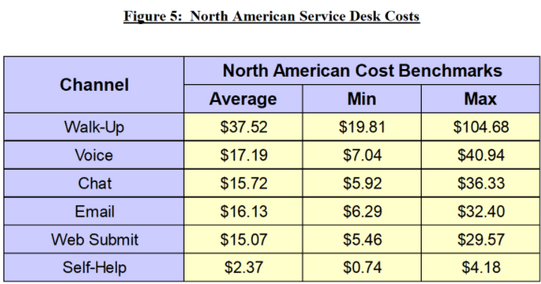
According to MetricNet, a self-serve resolution costs around $2.37, while an emailed answer averages $16.13. Nearly 7x more for essentially the same answer. Multiply that across every repeat question your team fields, and the cost of not having one findable source of truth adds up fast.
That's before you count the softer costs. The duplicated work. The conflicting answers from three different docs. The new hire who can't find the playbook. Scattered knowledge is a tax you pay every single day without seeing the invoice.
The findability gap (and the opportunity in it)
Here's where it gets interesting. People want to self-serve, but most of the time they can't finish the job.
A Gartner survey of 5,728 customers found that only 14% of issues are fully resolved through self-service, despite 73% of customers using self-service at some point in their journey.
Read that again. 73% try. 14% succeed. That's a canyon between intention and outcome.
And 45% of customers who started in self-service said the company didn't understand what they were trying to do. That's not a customer problem. That's a content problem. It's the difference between a knowledge base that technically exists and one people actually find their answer in.
The gap is your opportunity. Close it with better structure, better content, and one source everyone trusts, and the value compounds.
The compounding value of one source people trust
A single source of truth doesn't just pay off once. It pays off every time someone uses it.
For your team, it means fast, accurate, approved answers instead of "ask Sarah, she's been here longest." For new hires, it means dramatically shorter time-to-productivity. For your customers and partners, it means finding the answer instead of waiting for one.
The research holds up. Research published in the International Journal of Advanced Research in IT and Engineering found that knowledge management has a significant positive impact on customer satisfaction. And academic work in the Journal of Knowledge Management found that knowledge management practices are directly related to organizational performance. Organizations that manage their knowledge well are more agile, more innovative, and more competitive.
The market agrees, too. Business Research Insights estimates the knowledge base software market was worth roughly $1.74 billion in 2024 and will reach $6.96 billion by 2033. That kind of growth doesn't happen without proven returns.
What to track
To measure whether your knowledge base is earning its keep, keep an eye on:
- Self-service resolution rate: the share of people who find their answer without ever contacting you.
- Search success and zero-result searches: what people look for, and what turns up nothing.
- Content coverage and gaps: the questions coming in that your docs don't yet answer.
- Article helpfulness scores: are people finding what they read useful?
- Time to answer: how quickly someone (or something) gets to the right information.
- Customer satisfaction (CSAT): the ultimate read on whether self-service is working.
Track these and you can show tangible value, and make a strong case for continued investment. Numbers talk. Especially to the people holding the budget.
Common pitfalls to avoid
If building a world-class knowledge base were easy, everyone would have one. There are a few common challenges that derail even good intentions. Forewarned is forearmed.
Pitfall #1: Organizational silos
The big one. In many companies, information is trapped in departments, teams, or individual heads. Deloitte found that 55% of organizations cite silos as the most significant barrier to effective knowledge management.
To fix it, foster a culture of collaboration and make knowledge sharing a shared responsibility. Leadership has to champion it. (Yes, the execs need to use it too. Lead by example and all that.)
Pitfall #2: Lack of incentives
Why would a busy employee stop to write an article? If there's no clear reason, they won't. Make it obvious how contributing benefits both the individual and the company, through recognition, rewards, or a line in performance reviews.
Pitfall #3: Inadequate technology
The wrong tools make knowledge management slow and painful. If your software is clunky or missing features, people won't use it. This is why choosing the right knowledge base software matters. You want something user-friendly, powerful, and scalable.
 River Sloane
Pitfall #4: Poor content quality
A knowledge base is only as good as what's inside it. Poorly written, inaccurate, or out-of-date articles lose people's trust fast 😵
And the stakes are higher than they used to be. Bad content doesn't just frustrate a human reader. It feeds wrong information to AI agents, which then serve those wrong answers to customers at scale. One bad article can cause a hundred bad AI interactions.
Set clear content standards and a review process before anything gets published. A good place to start is creating an internal style guide your team can stick to.
Pitfall #5: Low user adoption
You can build the most beautiful knowledge base in the world, but if nobody uses it, what's the point? Promote it and weave it into daily workflows. Make it the path of least resistance:
- Add links inside ticket replies
- Share articles in Slack or Teams
- Put your knowledge base in your site's header or footer
- Use a self-serve widget that lives in the corner of your site
Pitfall #6: Chasing AI without foundations
The pressure to "add AI" is intense right now. But bolting an AI agent onto a neglected knowledge base is like putting a turbocharger on a car with bald tyres. It'll go faster, sure. It won't go well.
Before you invest in AI-powered support, make sure your content is accurate, comprehensive, well-structured, and maintained. AI amplifies the quality of your knowledge, for better or worse.
Frequently asked questions
What is a knowledge base?
A knowledge base is a self-serve library of information about a product, service, department, or topic. It's a single, organized, searchable place where the people who depend on you, your customers, partners, and your own team, can find answers without having to ask. It goes well beyond an FAQ page to include how-to guides, troubleshooting docs, tutorials, and reference material.
What's the difference between an internal and external knowledge base?
An internal knowledge base is private and built for your team, covering things like policies, playbooks, and onboarding.
An external knowledge base faces outward and helps customers and partners find answers for themselves, through user guides, troubleshooting, and API or integration docs.
The purpose is the same for both: one trusted place to find information. You don't have to keep them separate, and there are real advantages to keeping them together, since so much knowledge overlaps.
Is a knowledge base the same as a wiki?
Not quite. They look similar, but a wiki is typically an open, loosely structured space where anyone can add or edit pages, while a knowledge base is more curated, organized, and maintained as an authoritative source of truth.
A knowledge base prioritizes accuracy, structure, and findability over open-ended collaboration.
What's the difference between a knowledge base and knowledge base software?
A knowledge base is the collection of information itself.
Knowledge base software is the tool that creates, organizes, searches, and publishes it, providing the structure, analytics, and branding that a pile of documents can't.
You can technically build a knowledge base without dedicated software, but you'll spend most of your time fighting your own filing system.
Do I need separate knowledge bases for customers and my team?
No. Keeping internal and external knowledge in one place usually makes knowledge sharing easier, because there's so much crossover between what your team knows and what your customers and partners need.
Good knowledge base software lets you control who sees what, so you can keep one source of truth while still keeping private content private.
Wrapping things up
Phew. That was a lot. But hopefully you now have a much clearer picture of what a knowledge base is, how to build one, and why it's worth the effort.
We went from the crushing reality of losing hours to a bad search, to a single place where your customers, partners, and team can all find what they need. We saw how a well-tended knowledge base cuts wasted time, speeds up onboarding, and builds the kind of trust that compounds over time.
Here's the shift worth holding onto. A knowledge base isn't a support feature bolted onto the side of your company. It's infrastructure. One source of truth that serves everyone who depends on you. AI is just the newest thing drawing from it, and like everything else, it's only as good as the knowledge underneath.
The research is clear. The tools are more capable than ever. The only question left is whether you're ready to stop searching and start finding. Time to build your single source of truth.
If you haven't checked out HelpDocs yet, we offer a 14-day free trial 💖